
animate skill draws explainer videos in code, no video model
The MIT-licensed plugin draws every frame on one canvas, renders with Playwright Chromium and ffmpeg, and asks you to approve the storyboard before it animates.
Key takeaways
- animate is an MIT-licensed Claude Code skill by the GitHub user cth9191 that draws every frame of a short video procedurally on one HTML canvas and renders it to MP4 with a headless Chromium and ffmpeg.
- The repository was created on October 4, 2026 and carried more than 500 GitHub stars, read October 13, 2026.
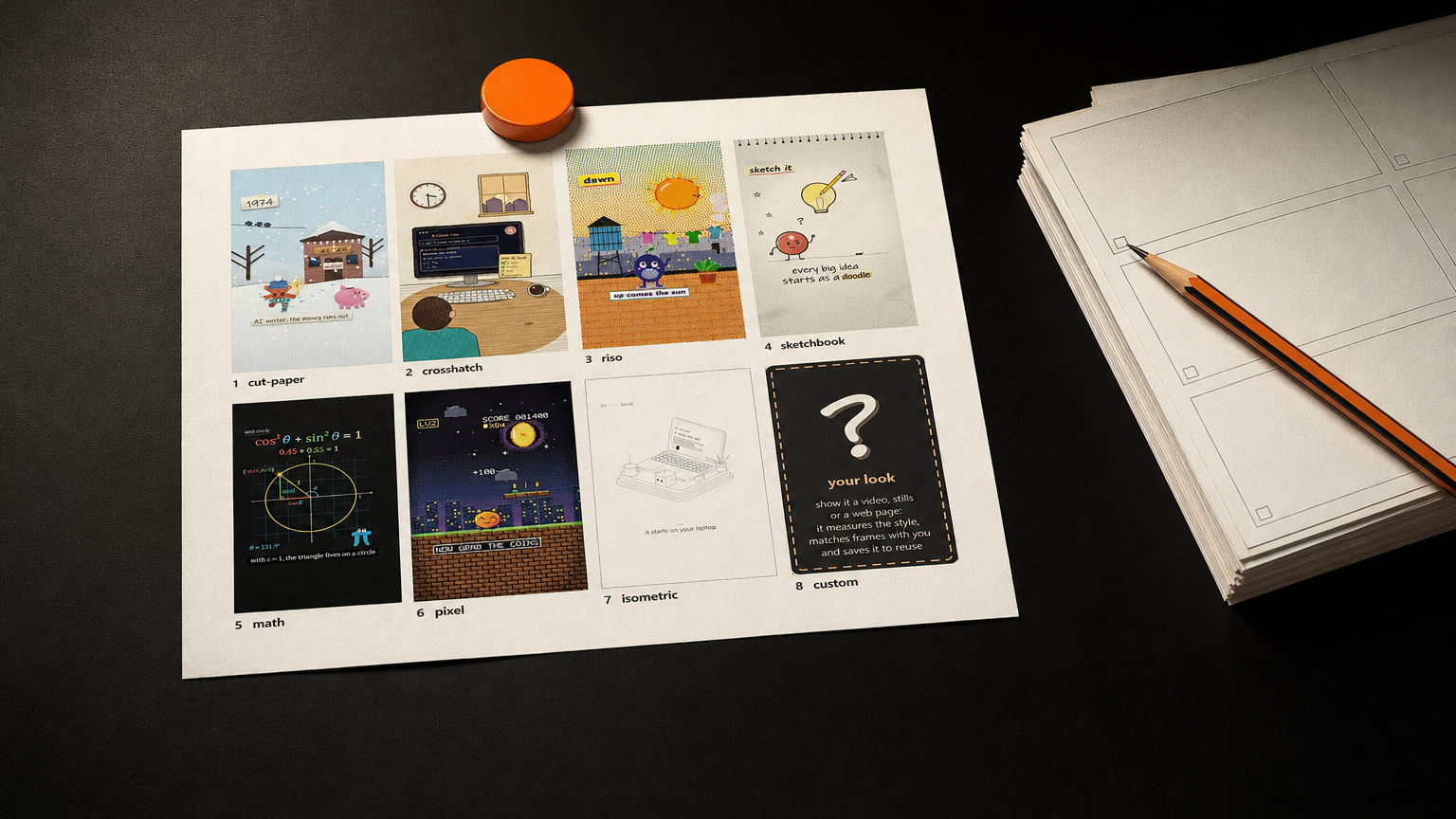
- It ships seven built-in styles (cut paper, crosshatch, riso, sketchbook, math, pixel and isometric) plus a look matched from the user's own references.
- It walks the user through three approval check-ins, story, look and storyboard, before it spends time animating.
A new open-source skill for Claude Code called animate makes short animated videos entirely in code, drawing every frame procedurally on a single HTML <canvas> with no video generation model anywhere in the loop. It is published by the GitHub user cth9191, carries an MIT license, and its repository was created on October 4, 2026. The README describes it as procedural animation in any style, rendered to MP4 with a headless browser and ffmpeg.
That makes animate a third route for anyone who uses a coding agent to make video: the piece is written as code, so the frames are yours, and re-running the same piece costs nothing but compute. A video model samples pixels from a prompt. A template tool assembles assets you never drew. animate draws its own frames.
What is animate?
animate is a plugin and a skill for Claude Code, Anthropic's command-line coding agent. Where a video model samples pixels, animate writes drawing code. Every piece compiles into one self-contained index.html, and the README says the build tool enforces that the code carries no image, audio or video files, no data: URIs, no URLs and no web fonts. Two exceptions are opt-in and belong to the user: screenshots and logos placed in a piece's assets/ folder, and one music track joined at export.
The output is deterministic. The skill's own SKILL.md lists seeded randomness as a non-negotiable and bans Math.random() and wall-clock time, so the same code re-run is frame-for-frame identical. One piece lays out 9:16, 1:1, 4:5 and 16:9 by drawing each shape rather than cropping a single render.
The install is real work. animate needs Claude Code, Node 18+, Playwright with Chromium, and ffmpeg on your PATH. A voice-over adds Python with faster-whisper for word timing and, optionally, the ElevenLabs connector for the voice.
How the workflow runs
The skill does not rush to render. Its first non-negotiable, per the SKILL.md, is that nothing animates before the storyboard is approved, and the reason it gives is that a wrong story or a wrong look costs a full build. So a run opens with one round of questions about subject, formats, voice, look, hero, music and product, then stops for three check-ins.
The first is the story check: animate picks a format and lays out a numbered beat table, with each beat's time, what happens, the bridge into the next beat, and what the sound is doing. The second is the look check, where it draws the two to four most different beats as full-size frames for a thumbs up or a reject. The third is the storyboard check, where every beat becomes a key frame with its sound and its transition, approved or rejected by panel number. Only then does it build.
Delivery comes with measured checks rather than a verdict of "looks good." The README lists them: cuts landing on the beat grid, the story arc's loudness, hero anchoring, the loudest moment landing after the silence, and narration pace. The independent write-up at frontiernow.dev notes that the review tool prints contact sheets, and the repository's review tool flags text that is cut off or overlapping.
The seven styles, and your own
A style in animate is a plug-in. The story grammar, timing, sound and renderer stay the same, and the style supplies the drawing kit. Seven ship in the box: cut paper, crosshatch ink, riso print, sketchbook, math, pixel and isometric. A piece picks one in its piece.json.
The eighth slot is not a style at all. Hand animate a video, some stills or a web page and it measures the references for palette, line weight, texture, motion and cut rhythm, draws one or two matched frames for approval, then saves the result as a reusable style folder. The README states that reference media stays on the user's machine, and the SKILL.md adds that it is never committed, never copied for its code, and its artist is not named in published output unless the user asks.
The repository's own example is a 60-second cut-paper piece, A short history of AI: 15 eras from Turing's "Can machines think?" in 1950 to Claude Code in 2025, a small orange spark that gains a ray each era, 13 shape-morph transitions, one hard cut on the payoff, and a synthesized score. The frontiernow write-up shows the storyboard check for that piece, 15 panels each stamped with its time, title and sound note.
What it costs
The tool itself is free. animate is MIT-licensed and runs on the user's machine, so re-rendering a piece costs compute and nothing else. The README lists the runnable tools directly, from a build step to stills, storyboards, beat-mapping, screenshots, voice and export, which means a creator can drive them without going back through the whole skill.
What you pay for is the model. Every frame, every script line and every revision is generated by Claude Code, so the bill is the tokens the agent spends and the electricity your machine burns stepping frames through Chromium and ffmpeg. For a creator used to a video model that bills per attempt and re-rolls the whole shot when one detail moves, that trade is the point: a nudge to a beat re-renders the piece, it does not re-roll it.
What it cannot do
animate cannot make anything it did not draw. There is no footage, no photoreal render and no real people in frame, because there is no generation model in the loop. It draws explainers, histories, launch clips and little stories, and that is the ceiling.
The prerequisites are not light. Node, Playwright's Chromium and ffmpeg all have to be on the machine, and the skill stops and asks the user to install whichever is missing. A voice-over needs either the ElevenLabs connector or the user's own recording, and word-level timing wants Python with faster-whisper installed locally.
The frontiernow write-up is candid about the limits, and it quotes the repository's own honesty section. Of the eight story formats animate ships, the repository's own honesty section says three, the chronology joined by shape morphs, the mission and the fixed-hero journey, have each produced a piece that passed every check; the isometric style has so far only its demo and has not carried a full piece; and the WebGL motion-design style the README teases is not shipped yet. The repository is young. Its API entry shows one open issue and a creation date of October 4, 2026.
How it compares with video models and template tools
A video generation model and animate sit at opposite ends of the same job. The model bills per attempt and re-rolls the whole shot when a detail changes; animate draws every frame from code, deterministically, so a revision is another render rather than another generation. A model wins when you need footage you cannot draw. animate wins when the video is a diagram, a history or an argument, and the visuals should be exactly what you specified.
The template route is the other neighbor. A tool like Remotion, which frontiernow names as the template comparison, assembles assets into a timeline, and frontiernow's judgment is that the visuals are not yours to control. animate keeps a single canvas and a style kit, so the drawing is code the creator can read and change. The trade is that animate gives you fewer moving parts and a more opinionated flow: three check-ins before a single frame animates, and a measured review after.
The frontiernow piece names two closer relatives on the same beat, huashu-art-motion, which also draws with canvas code and offers more styles and narration grammars, and brag, a shorter path for turning a project into a 20-second launch video. animate's difference is the confirm-before-rendering order, the beat-level storyboard, and the honest list of what it has and has not proven.
To install animate, add the plugin in Claude Code with /plugin marketplace add cth9191/animate then /plugin install animate@animate, or pull the skill with npx skills add cth9191/animate --skill animate, after installing Playwright's Chromium and ffmpeg on your PATH.
Sources
- github.com - README, workflow, styles, install, example, MIT license
- api.github.com - created date, MIT license key, stars, forks, open issues
- github.com - the skill's own non-negotiables and requirements
- frontiernow.dev - independent write-up, install command, proven-formats caveats, star and fork figures
- skills.sh - plugin marketplace listing, install command, install count, star figure
- claudepluginhub.com - marketplace listing, version 0.4.0, MIT