
How GPT-6 and Runway remade an AI short in about a day and a half
We are huge fans of Tim Simmons' Theoretically Media, and this week he rebuilt his 2025 short film by pointing GPT-6 in Codex at Runway's MCP, then finished the cut in DaVinci Resolve without touching the mouse. Watch it, then subscribe to his channel.
Key takeaways
- Theoretically Media's remake of The Bridge ran about 357.5M processed tokens and used roughly 70% of the creator's weekly Codex usage, according to an on-screen breakdown in his September 17, 2026 walkthrough.
- Connecting the agent to Runway took one sentence in Codex, and Runway's MCP page lists ChatGPT, Claude, Grok Bot and Cursor among the assistants that can call Runway's tools the same way.
- Runway's Seedance 2.5 can output ProRes 4:2:2 HQ, an option the agent never picked and one the creator says avoids the MP4 compression banding he saw in early shots.
- The Resolve finishing pass, covering the grade, Dehancer film grain, Fusion title cards and a three-channel audio mix, ran on spoken instructions alone, while the agentic edit attempt failed to beat the creator's own cut in Premiere.
This week in Theoretically Media: The GPT-6 & Runway Workflow That Remade an AI Short Film in About a Day and a Half
This week in Theoretically Media is our standing look at what Tim Simmons is teaching on his channel. We are huge fans of this show and we are not neutral about it: if you make anything with AI video, Theoretically Media is the channel to watch. Subscribe to him on YouTube, follow him on X, and give this week's episode a like - he earns it.
This week he remade one of his first AI short films in about a day and a half, and most of the pipeline ran through a chat window. He scripted it, cast it, shot it and finished it by talking to GPT-6 in Codex, and Codex drove Runway, then DaVinci Resolve, on his behalf.
He published the full walkthrough on September 17, 2026, in a 19-minute video called "This Cinematic AI Film Workflow Changes Everything." The film is a remake of The Bridge, which he first released in 2025 on an early access build of Google's Veo-2. The video is sponsored by Runway, which backed the remake, so treat the pipeline below as the account of an interested party who is also the person who ran it.
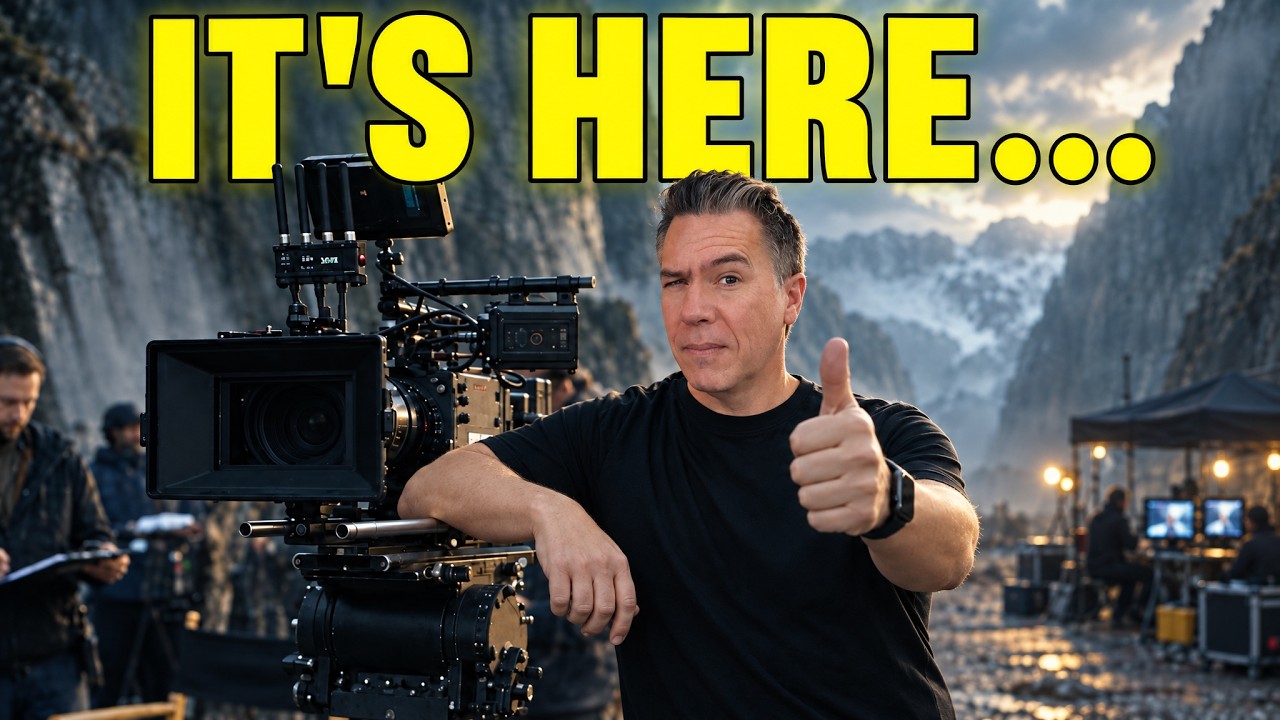 The walkthrough covers script, cast, shots, grade, titles and mix in 19 minutes. Still: Theoretically Media on YouTube.
Everything that follows comes from that video: his narration, the on-screen graphics he built for it, and the screens visible behind him. No part of this workflow was run for this article.
Who Is Tim Simmons?
He is a working filmmaker rather than a tool reviewer, and that is why the walkthrough carries weight. Tim Simmons runs Theoretically Media, where he stress-tests the creative-AI stack and publishes what survives. He is not part of SLOP TV and has no connection to us: we are viewers of his channel, and devoted ones, which is why he gets a standing column here rather than a one-off write-up. His own account of his background, on the channel's about page, is 17 years in professional film production and Hollywood studios, and he states the channel's principle in one line: "You can do more now than ever before."
The receipts are the reason to name him. His work and analysis have been cited by Forbes, Decrypt, ICG Magazine, TV Tech and CineD, and he has spoken on creative AI at the HPA Tech Retreat, the Philly Ad Club and Curious Refuge. His own AI short films, Dead Sea and Dragon Blue, are why the pipeline below reads as a production account instead of a demo: the person describing it ships films with it.
The video this article follows is his most recent upload as of September 20, 2026 — "This Cinematic AI Film Workflow Changes Everything," published on September 17, 2026 — and it had drawn about 67,000 views. It landed three days after he posted the finished film itself, "The Most Epic AI Short Film You'll See Today (Seedance 2.5 & Astra)," then on about 80,000 views. He is at @TheoreticallyMedia on YouTube and @TheoMediaAI on X.
What He Made, and Why the Timing Mattered
The Bridge 2.0 is a short fantasy dialogue scene at a bridge gate, where a barbarian meets a gatekeeper who demands a toll. In the 2025 version, that gatekeeper was a silent death figure. In the 2026 version he is a talking corpse with an orange-eyed close-up and a lip-synced line delivery, which is the whole difference in one image.
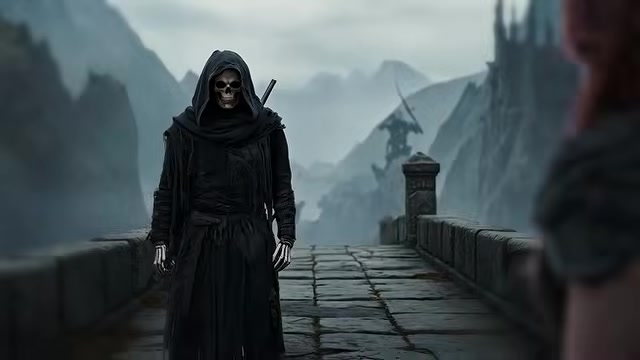 The 2025 original: a death figure who never had to speak. Still: Theoretically Media at 00:57.
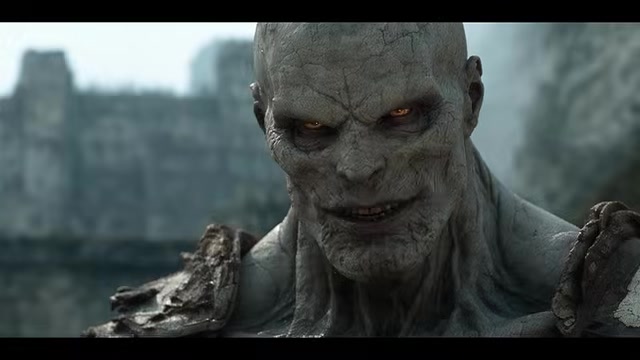 The 2026 remake: the same beat with a lip-synced ghoul delivering the line "Ah, but to pass you must pay the toll." Still: Theoretically Media at 01:14.
The old film took about a week, which Tim describes as a grind: early access Veo-2 shipped without audio and without multi-referencing, so dialogue and lip sync had to come from a third party. The only way he could hold a character across shots was a hack of prompting "cut immediately" after the first frame. The remake took about a day and a half, including cleanup. The gap between the two versions is two years.
What the Workflow Requires
Four things, before any generation happens.
- Codex on the desktop. He tells viewers to download the ChatGPT desktop app and set it to Codex. Runway's own MCP page says the connection works in "ChatGPT, Claude, Grok Bot, Cursor and other compatible agents", so Codex - which runs inside that same ChatGPT desktop app - is one of several clients that can drive Runway this way.
- A Runway account. Seedance 2.5 runs on Runway, and Runway is where the shots were generated.
- Runway's MCP connection. https://runway.com/mcp
- Midjourney for references, DaVinci Resolve for the finish, and Dehancer for grain. The character work started in Midjourney. The finishing pass happened in Resolve with the Dehancer plugin.
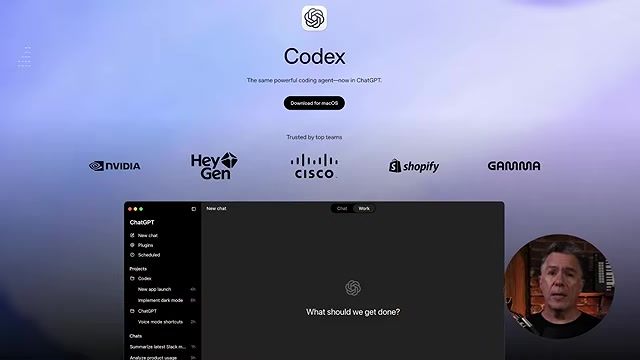 Codex sits inside the ChatGPT desktop app; the video's instructions to set it up amount to downloading that app and switching to Codex. Still: Theoretically Media at 03:27.
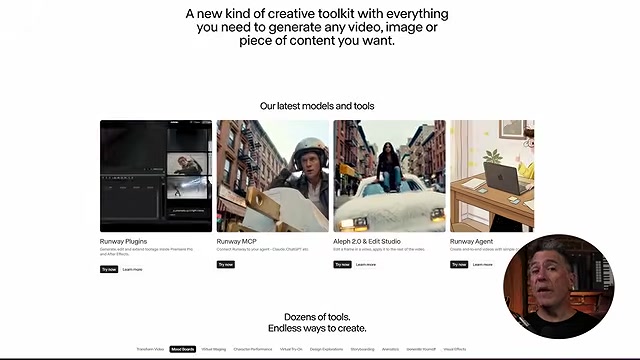 Runway markets the same surface four ways: plugins inside Premiere Pro and After Effects, MCP for Codex and other assistants, Aleph 2.0 and Edit Studio, and Runway Agents. Still: Theoretically Media at 12:20.
Step 1: Point the Agent at Runway
This is the shortest step in the video and Tim calls it the easiest part of the whole project. You open Codex and ask it, in plain language, to hook up the Runway MCP. There is no configuration walkthrough in the video because there was nothing to walk through.
The concept behind it is standard by now. MCP stands for Model Context Protocol, and Tim's own explanation card describes it as "a standard way for AI assistants to connect to tools." The connection is what turns a chat window into something that can call Runway's models, list outputs and pull finished clips back.
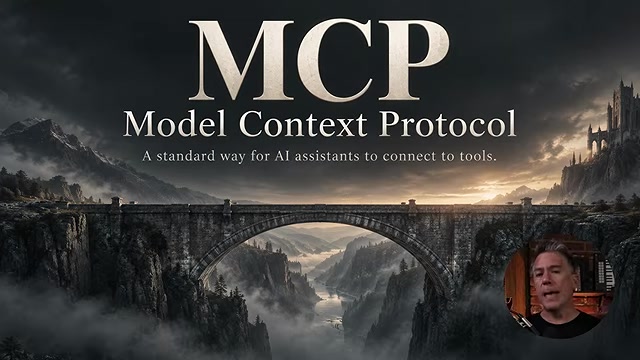 The video's MCP card. Still: Theoretically Media at 03:06.
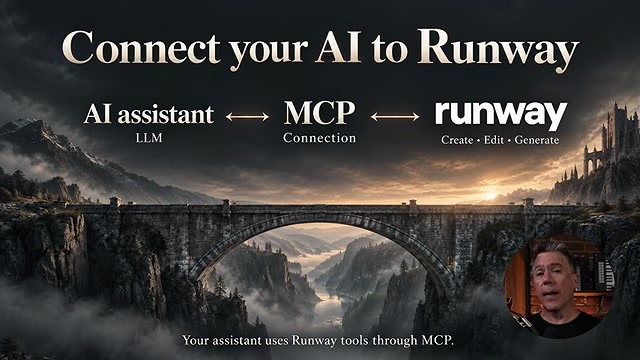 The connection in one diagram: the assistant talks MCP, MCP talks Runway, Runway creates and edits. Still: Theoretically Media at 03:14.
If you build nothing else from this article, build this: an assistant with a tool connection and no instructions will improvise. The next step fixes that.
Step 2: Give the Agent a Studio Folder
The center of the workflow is a folder structure Tim calls the Theoretically studio film skill. It is the part he keeps revising, and the part he says makes everything else reproducible.
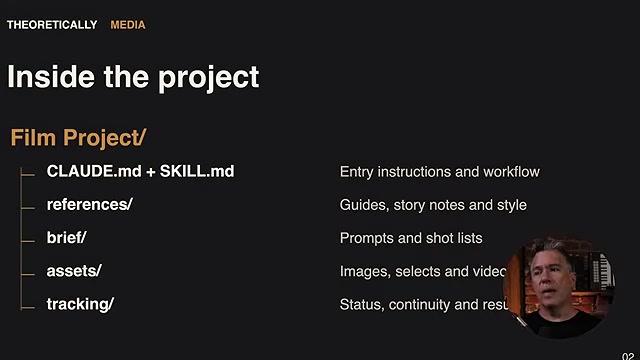 The project root: CLAUDE.md and SKILL.md for instructions and workflow, then references, brief, assets and tracking. Still: Theoretically Media at 04:18.
Five moving parts:
- CLAUDE.md and SKILL.md at the root. These are the entry instructions: how his films are built, what order the phases run in, how prompts are written.
- references/ holds the style guides and story notes.
- brief/ holds prompts and shot lists.
- assets/ holds images, selects and video.
- tracking/ holds status, continuity and everything else.
The point of the layout is portability. Tim says he can point Claude at it, or Codex, or Kimi K3, and any of those models will know how his films are structured and how to execute them. The folder is the product; the model is interchangeable.
Inside the skill sits a four-phase production order that the agent follows from phase 01 to 04.
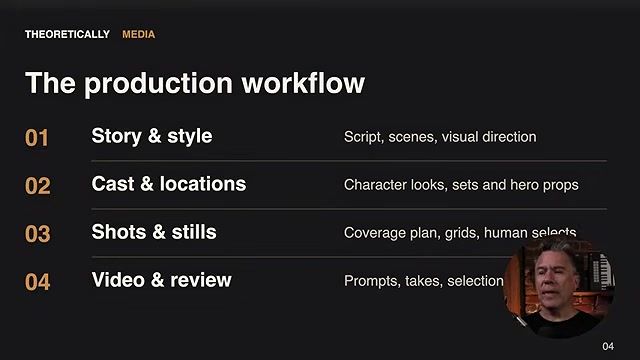 Story and style, cast and locations, shots and stills, video and review. Still: Theoretically Media at 04:26.
In practice the folder fills with named documents and style references, which is exactly why he needed the next tool.
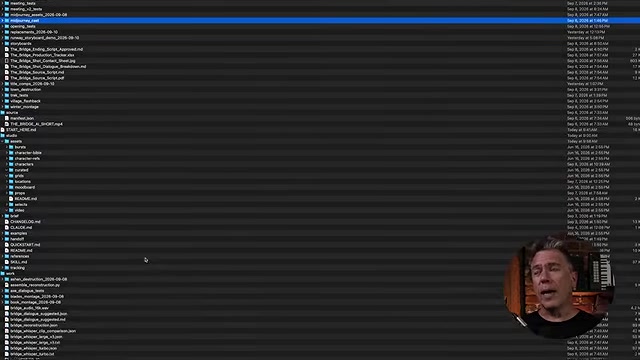 Style reference documents (FILM_STYLE_REFERENCE.md, SHOT_STYLE_REFERENCE.md, VIDEO_STYLE_REFERENCE.md, HUMAN_ACTION_STYLE_REFERENCE.md) sit alongside timeline, production prompt and story bible files. Still: Theoretically Media at 04:50.
Step 3: Rebuild the Script and the Cast From the Old Film
With the folder in place, Tim had Astra go through the first version of the film and generate a script and a shot list from the material it already had. The script came out of the 2025 film plus the style references in the folder.
While that ran, he went to Midjourney for initial character references and location plates. The gatekeeper was the interesting case. In the 2025 version he had used a death figure for one practical reason: a silent character needs no lip sync, and lip sync was out of reach. In the remake, lip sync was no longer a constraint, so the character could become the ghoul he wanted.
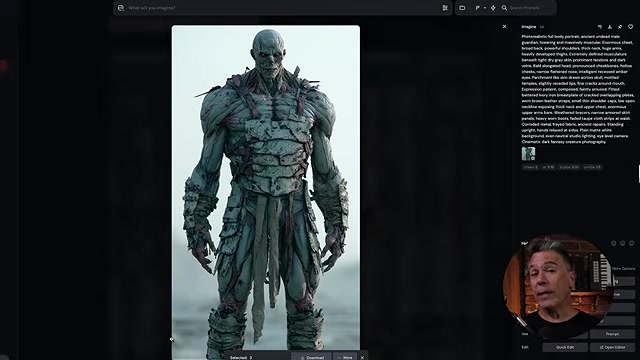 The character reference stage: generate, inspect, keep the full prompt next to the image. Still: Theoretically Media at 05:22.
Step 4: Generate the Turnarounds as Video
The next step is one he holds up as a theory rather than a rule. Take the character sheet and generate a 360 rotation of the character using the video model you plan to shoot with, which in this case was Seedance 2.5 on Runway.
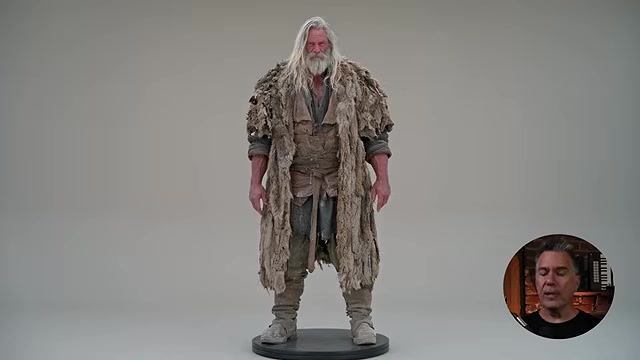 A turnaround generated as video, not assembled in an image editor. Still: Theoretically Media at 05:41.
His reasoning: if the back of the character is generated by the same model that will shoot the scene, that model now has an opinion about what the back of the character looks like. Assembling a rotation in an image editor teaches the editor, not the model. He is explicit that this is speculation, and the experiment costs one generation.
Step 5: Build a Production Dashboard
This is the new element in the workflow, and Tim calls it an absolute game changer. It is a plain HTML file sitting on his desktop, pointed at the project folder. No app, no service.
The problem it solves is the one the folder itself creates. Once the skill folder has a few days of work in it, the model can navigate it and Tim cannot. The dashboard turns the folder into something he can read at a glance.
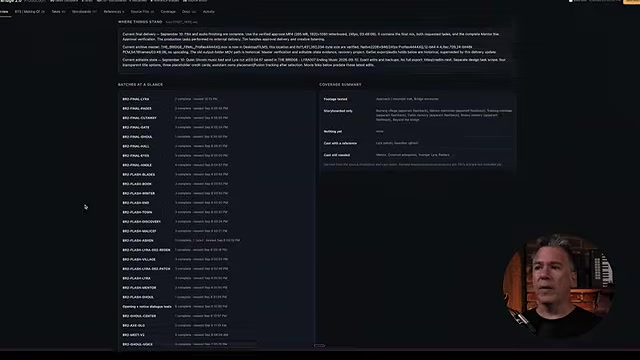 A snapshot banner across the top, a batch table on the left, a coverage summary on the right. Still: Theoretically Media at 07:04.
The tabs cover the whole production:
- Every shot, playable in the page, with the prompt that made it and space for notes underneath.
- Storyboards and references, including a small tribute to the 2025 film.
- A breakdown of locations, scenes and sequences with what happens in each.
- Coverage views that show what has been generated against what the shot list still needs.
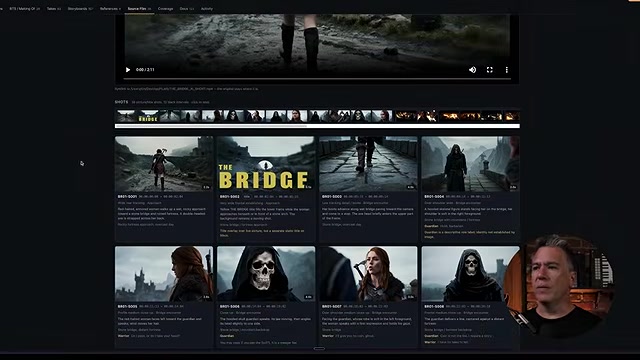 Shots, thumbnails and the generating prompt in one view; the 2025 poster sits in the strip as a reference. Still: Theoretically Media at 07:36.
The last tab is the one that does quiet work. It is a session diary. At the end of each session the agent writes up what was done in it, so that when Tim forgets, the project can remind him.
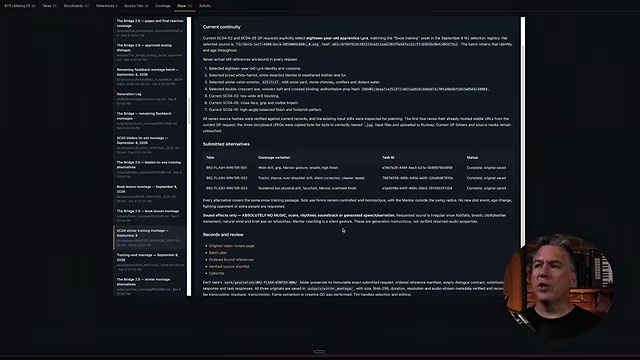 The notes tab holds continuity detail scene by scene, written at the end of each session. Still: Theoretically Media at 08:16.
From there the loop is ordinary production: create images, review them, send the approved ones to Runway for generation, bring the results back, file them, note what happened.
Step 6: Direct by Voice
The part that felt like stepping into the future, in his words, is that he directed most of it by speaking. Codex's voice mode took conversational directions, the kind of chatty instruction you would give a person, and the studio skill translated them into structured prompts, because the skill encodes how he likes to prompt.
That division of labour is the workflow in miniature. He acts as the director and reviews the footage; Astra acts as the production manager handing instructions to Runway; Runway acts as the creative house. The agent-to-agent part runs without him; the approval step does not.
Step 7: Keep One Eye on the Platform
The agent did not think of everything, and Tim puts this in the video as a warning rather than a quirk. In Seedance 2.5 on Runway, you can generate in ProRes 4:2:2 HQ. That option sidesteps the MP4 compression banding he saw in early shots. The agent never reached for it.
His advice: circle back to the platform, look at what the options are, and assume the agent does not know that some of them exist. An agent optimizes for the path it already knows. Output format and model choice are where that blind spot shows up, and in this project the ProRes option would have been useful from the first shots rather than several days in.
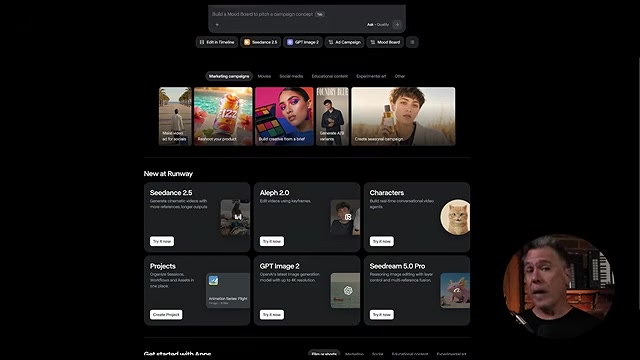 Runway's home screen lists the models and apps available, including Seedance 2.5, GPT Image 2, Aleph 2.0 and Characters. Still: Theoretically Media at 09:36.
Step 8: The Wait, and Why He Cut the Film Himself
Less friction did not mean less time. Tim says the workflow felt slower than the old one, and he traces it to the loop around each shot: the agent assembles the prompt, sends it to Runway, waits, brings the clip back and files it in the right folder. That turnaround includes dead time where he is simply waiting.
He filled some of it by testing Astra as an editor. The agent started placing clips on his Premiere timeline, and that is where the experiment stalled. Adobe had no MCP, so the agent needed computer use, which consumed a monitor. Tim says it would get angry, in his phrase start yelling at him, if he moved anything while it worked. His summary is blunt: he is faster.
Two things came out of that stretch anyway. Runway announced Premiere Pro and After Effects integration while the film was in production, which puts generation on the edit timeline without a browser or a script, and Runway's plugins page carries it now. And the first cut of The Bridge 2.0 was made by hand, with a few spots left open for the finishing pass.
Step 9: Finish in Resolve Without Touching the Mouse
The finishing pass is the strongest demonstration in the video, because Resolve is not a friendly application to drive blind. Tim exported an XML of the Premiere cut and imported it into DaVinci Resolve, a step he tried to film and then abandoned because it looks like nothing happening.
From there he handed over the grade with one sentence, along the lines of "go ahead and color correct this." Four things happened in sequence.
The grade. Seedance output is Rec.709, not log and not raw, so this pass adjusts colour that is already baked into the file rather than recovering latitude. Tim is open about not being the person to do this himself.
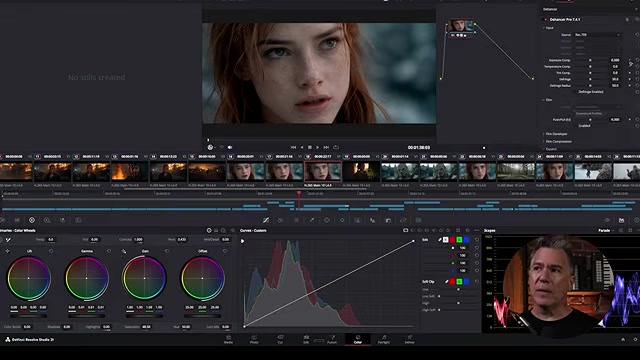 The Color page: lift, gamma, gain and offset wheels, a custom curve, and the film's coverage in the timeline strip above. Still: Theoretically Media at 15:10.
The grain. A plugin called Dehancer was added to the chain for a film grain look.
The headroom option. He notes that the clips could have gone through Ruby, Runway's model that takes SDR clips and redistributes brightness and colour into an HDR container. He is careful about what that is and is not: it does not turn the footage into log, and it does not recover detail that was never captured. It creates headroom for a grade. Runway's own academy page documents the model at https://academy.runwayml.com/tutorial/runway-ruby. In the video, a deliberately extreme push shows how far the grade can go once that headroom exists.
The trims and titles. Small edits were spoken in the same way, including an instruction to jump to a timecode he reads as 01914 and pull the shot back a few frames, and another to add a cross dissolve. Both were executed. The opening and closing title cards were built in Fusion, at a level Tim describes as minor in node terms, with the caveat that he does not read Fusion node graphs and can only move them around.
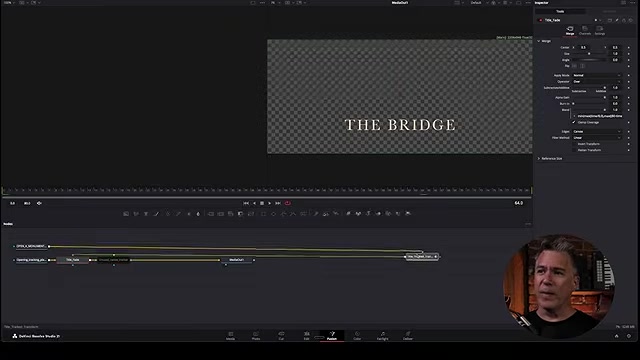 The opening title card sitting in the Resolve timeline as a Fusion composition. Still: Theoretically Media at 16:48.
The mix. The audio pass ran as a separate instruction. The original audio stayed where it was, and three new channels were created for dialogue, music and ambience. Tim's assessment is that the mix was mostly leveling and smoothing, not repair.
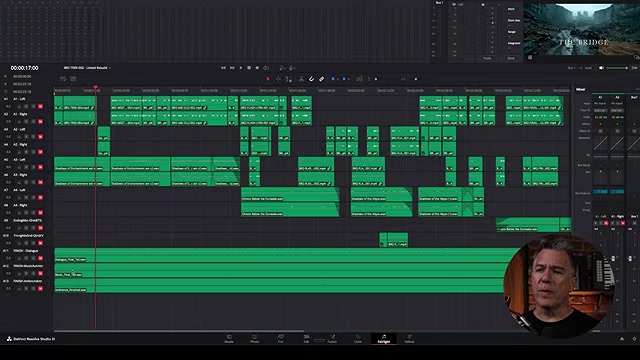 Dialogue, music and ambience on their own channels, levelled against the picture. Still: Theoretically Media at 17:00.
He did not touch the mouse in Resolve.
Step 10: What It Cost
The video puts numbers on this, with a caveat worth repeating: the breakdown is built from Tim's recollection of his usage meter, not from an export, and token totals include reused context, so they do not convert directly into a plan percentage.
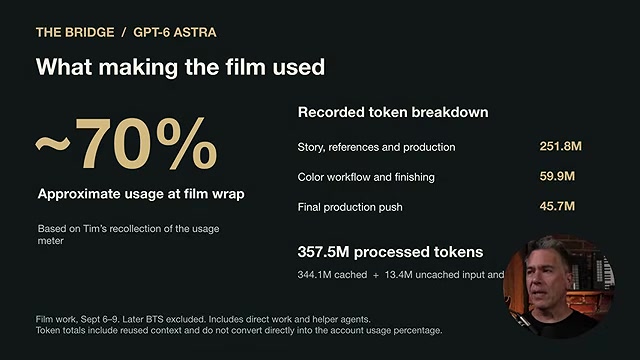 About 70% of a week's usage at film wrap, on 357.5M processed tokens. Still: Theoretically Media at 17:36.
The headline figure is roughly 70% of his weekly Codex allowance for one short film, on his top plan, leaving about 30%. The token split behind it breaks into 251.8M for story, references and production, 59.9M for the colour workflow and finishing, and 45.7M for the final production push, from a total of 357.5M processed tokens (344.1M cached, 13.4M uncached input).
He also names the waste. He left the tool on its Ultra setting a number of times by accident and says much of the film would have been fine on medium or low. And under the heading "the agentic detour," he accounts for about 18M processed tokens spent on research, download and installation, which in practice meant watching an agent install DaVinci Resolve on his machine.
 About 18M processed tokens for a step he could have done by clicking Next. Still: Theoretically Media at 17:42.
The Workflow in Order
- Install the ChatGPT desktop app, set it to Codex, and have a Runway account.
- In Codex, ask it to connect the Runway MCP.
- Build or reuse a film skill folder: CLAUDE.md plus SKILL.md, with references, brief, assets and tracking subfolders, and the four phases (story and style, cast and locations, shots and stills, video and review) written down inside.
- Have the agent read the source material and produce a script and shot list.
- Generate character references and location plates in Midjourney.
- Generate 360 turnarounds with the video model you intend to shoot with.
- Build a dashboard over the project folder so you can see shots, prompts, boards and continuity without opening a file tree.
- Have the agent write a session note at the end of every session.
- Direct by voice; review every shot and bin what does not work.
- Check the platform's own output options yourself, including ProRes 4:2:2 HQ in Seedance 2.5.
- Export an XML from your editor and import it into DaVinci Resolve.
- Run the grade, grain, trims, Fusion titles and the audio mix as spoken instructions, then watch the result end to end.
Where This Is Heading
Tim closes on the two-year gap and the next phase. Real time generation and world models are the pieces he points at: Runway demonstrated GWM Worlds 2, real-time interactive generated worlds with audio, and publishes research on real-time video, which is where the interaction between a director and a shot stops being a queue. He suggests watching the two versions of The Bridge back to back to feel the span rather than read the specs.
His stated takeaway is smaller than the pipeline. The tools exist to serve what you want to make, and the useful move is to learn what they can and cannot do, then point them at your own work.
Watch the show, then subscribe
Do this before you close the tab. Subscribe to Theoretically Media on YouTube - it is free, it is the best channel on this beat, and it is how he keeps making films like this one. Follow Tim Simmons on X. Watch this week's episode and hit like on it: This Cinematic AI Film Workflow Changes Everything, 19 minutes. Then watch the film he made with it, The Most Epic AI Short Film You'll See Today, and the 2025 original back to back - that pairing is how he suggests feeling the two-year gap rather than reading the specs.
The remake is on Theoretically Media's channel under the title "The Most Epic AI Short Film You'll See Today (Seedance 2.5 & Astra)" at https://youtu.be/f8FHas1dmt8, and the 2025 original, "THE BRIDGE: A Stunning AI Film Created with Veo-2," is at https://youtu.be/YDlME4qvER8. The studio film skill and a full tutorial are going out through his newsletter at https://theoreticallymedia.com/newsletter/, and Runway's MCP is at https://runway.com/mcp.
Workflow card
- Film: The Bridge 2.0, a remake of a 2025 AI short film
- Filmmaker: Tim Simmons, Theoretically Media - an independent channel we cover as fans, not affiliated with SLOP TV
- Agent: GPT-6 (Astra) in Codex, on the ChatGPT desktop app
- Tool connection: Runway MCP
- Video model: Seedance 2.5 on Runway
- References: Midjourney
- Finish: DaVinci Resolve, with Dehancer for grain and Fusion for titles
- Output option worth knowing: ProRes 4:2:2 HQ in Seedance 2.5
- HDR option: Ruby, Runway's SDR-to-HDR model
- Reported usage: about 70% of a week's Codex allowance, 357.5M processed tokens
- Reported time: about a day and a half, film work September 6-9, 2026
- Sponsorship: the video is sponsored by Runway, which backed the remake
Sources
- youtube.com - the creator's own step-by-step walkthrough, published September 17, 2026; every figure in this article comes from it or from its on-screen graphics
- youtu.be - the remake film; title and channel confirmed through YouTube's oEmbed endpoint
- youtu.be - the 2025 original film, also confirmed through oEmbed
- runway.com - Runway's MCP page, listed in the video description and reachable at the time of writing
- academy.runwayml.com - Runway's own Ruby SDR-to-HDR tutorial
- runway.com - Runway's Premiere Pro and After Effects plugins, announced during the making of this film
- blackmagicdesign.com - DaVinci Resolve product page
- dehancer.com - Dehancer, the film grain plugin used in the grade
- theoreticallymedia.com - Tim Simmons's own about page: 17 years in film production, citations, talks, short films, the channel's principle
- youtube.com - the channel's own upload feed: episode dates and view counts for the September 14 and 17, 2026 videos
- youtube.com - the channel itself